
RREF Calculator with Step-by-Step Solutions Instantly
Find the reduced row echelon form of any matrix in seconds. Enter your values below, and this RREF calculator walks through every row operation using exact fractions (not rounded decimals), so you always get a clean, accurate answer.
Matrix
Cells accept integers, decimals, or fractions such as 3/4. Use arrow keys to move between cells.
Scroll to see more columns →
Result
Enter a matrix and press Calculate to see its row echelon forms, rank, and step-by-step reduction.
Calculating…
Reduced Row Echelon Form
Row Echelon Form (REF)
Step-by-step solution (0 operations)
Table of Contents
What Is Reduced Row Echelon Form (RREF)?
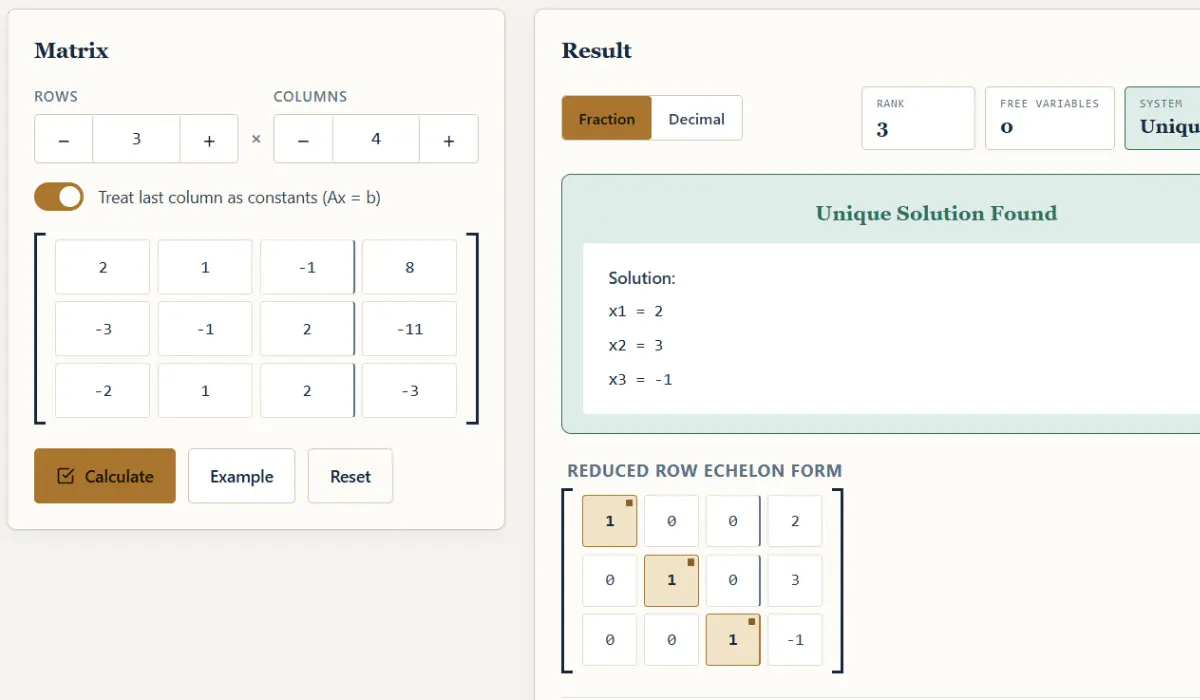
Reduced row echelon form is the simplest version a matrix can be reduced to using elementary row operations. A matrix is in RREF when it meets four conditions:
- Every row that isn’t all zeros has a leading 1 (called a pivot), and that 1 is the first nonzero entry in the row.
- Each pivot sits to the right of the pivot in the row above it.
- Every entry above and below a pivot is zero, not just below, like in ordinary row echelon form.
- Any row made entirely of zeros sits at the bottom of the matrix.
That third condition is what separates RREF from plain row echelon form (REF), and it trips a lot of students up. REF only requires zeros below each pivot; RREF goes a step further and clears the column above the pivot too, which is why RREF is sometimes called the “canonical” form: there’s only one RREF for any given matrix, no matter which order you perform the row operations in. REF doesn’t share that property; you can land on more than one valid row echelon form depending on your choices along the way.
| Type | Row Echelon Form (REF) | Reduced Row Echelon Form (RREF) |
|---|---|---|
| Leading entry in each row | Any nonzero value | Must be 1 |
| Entries below a pivot | All zero | All zero |
| Entries above a pivot | Can be non-zero | Must be zero |
| Uniqueness | Not unique | Unique for a given matrix |
| Solving a system | Needs back-substitution | Solution can be read directly |
How to Use This RREF Calculator?
This calculator handles square and non-square matrices, including augmented matrices, so you can solve a full system of linear equations (Ax = b) in one pass, not just reduce a bare coefficient matrix. Using it takes four steps:
- Set the size of your matrix. Use the row and column controls to match the system you’re working with.
- Enter your values. The calculator accepts integers, decimals, and fractions (like 3/4) in any cell; use the arrow keys to move between them quickly.
- Toggle “treat last column as constants” if you’re solving a system. This tells the calculator to interpret your matrix as an augmented matrix (Ax = b) rather than a plain coefficient matrix.
- Press Calculate. You’ll get the row echelon form, the reduced row echelon form, the rank, and a full step-by-step breakdown of every row operation used to get there.
Not sure what a matrix should look like after reduction, or want a clean copy to study from? Use Example to load a sample matrix, or Download .txt to save the full step-by-step solution for later.
A Worked Example: Reducing a 3×3 Matrix
Here’s a quick example that shows what the calculator is actually doing behind the scenes. Take this system of equations:
 2x +  y −  z =  8
-3x −  y + 2z = -11
-2x +  y + 2z = -3
Written as an augmented matrix, that’s:
[ 2   1  -1 |  8 ]
[-3  -1   2 | -11]
[-2   1   2 | -3 ]
Running Gauss-Jordan elimination on this matrix gives:
[ 1   0   0 |  2 ]
[ 0   1   0 |  3 ]
[ 0   0   1 | -1 ]
And that’s it. The solution is sitting right there in the last column: x = 2, y = 3, z = -1. No substitution, no extra algebra.
This example skips over the individual row operations to keep things quick. If you want to see each operation spelled out, including which rows get multiplied by what, in what order and why, our step-by-step guide to calculating RREF by hand walks through the full process, including how to handle fractions and larger matrices without losing track of your work.
How This Calculator Works?
This RREF calculator is built on Gauss-Jordan elimination, the standard method for reducing a matrix using a sequence of elementary row operations: swapping rows, scaling a row by a nonzero constant, and adding a multiple of one row to another.
The one thing worth knowing is that it works in exact fractions internally rather than decimals. A lot of matrix calculators will happily hand you something like 0.3333333 and leave you to guess whether that’s meant to be 1/3 or an actual decimal value baked into the problem. This calculator keeps every intermediate value as an exact fraction, so what you see is the real answer, not a rounded approximation of it. It computes the row echelon form, the reduced row echelon form, and the rank of the matrix all in the same pass, so you don’t need to run the calculation twice to get both.
What Is RREF Used For?
Reducing a matrix to RREF isn’t just an exercise. It’s one of the most practical tools in linear algebra, and it shows up constantly in coursework, research, and applied fields like engineering, computer science, and economics. A few of the most common uses:
- Solving systems of linear equations. This is the big one. Once an augmented matrix is in RREF, the solution, or the relationship between variables if there isn’t a single unique solution, is immediately visible.
- Checking whether a system is consistent. If the RREF contains a row like
0 0 0 | 5, the system has no solution. That row is saying “0 = 5,” which is never true, so the equations contradict each other. - Finding the rank of a matrix. The rank is simply the number of nonzero rows (pivot rows) in the RREF. It tells you how many independent equations, or how much genuinely new information, the matrix actually contains.
- Identifying free variables. When a system has infinitely many solutions, the columns without a pivot in RREF correspond to free variables, and the solution can be written parametrically in terms of them.
- Determining invertibility. For a square matrix, if its RREF is the identity matrix, the matrix is invertible. If a row of zeros shows up instead, it isn’t.
Finding RREF on a TI-84 Calculator?
If you’re working through homework or sitting an exam, you probably won’t have access to this page. But your TI-84 can compute RREF on its own using the built-in rref( function, which lives in the Matrix menu. The process involves entering your matrix into one of the calculator’s matrix slots, then calling the rref( command on it from the home screen.
It’s a genuinely useful skill to have memorized, since most linear algebra courses expect you to be able to do this without a laptop in front of you. Our full TI-84 guide for RREF walks through the exact steps, from entering a matrix of the right dimensions to reading fraction-formatted results off the screen, so you’re not fumbling through calculator menus during a timed test.
Frequently Asked Questions
Does this RREF calculator show the steps, or just the final answer?
It shows both. Every calculation returns the row echelon form, the reduced row echelon form, the rank, and a full breakdown of each row operation used along the way, not just the end result.
Can this calculator handle fractions and decimals?
Yes. You can enter values as integers, decimals, or fractions (like 2/3) directly into the matrix, and the calculator works internally in exact fractions to avoid rounding errors in the output.
What’s the difference between row echelon form and reduced row echelon form?
Row echelon form (REF) only requires zeros below each pivot. Reduced row echelon form (RREF) goes further and requires zeros both above and below each pivot, with every pivot scaled to exactly 1. RREF is also unique for a given matrix; REF is not.
Can I use this calculator to solve a system of equations (Ax = b)?
Yes, toggle “treat last column as constants” before calculating. This treats your matrix as an augmented matrix, and the resulting RREF will give you the solution to the system directly, when one exists.
How do I calculate RREF by hand, without a calculator?
It takes a sequence of elementary row operations (row swaps, scaling, and adding multiples of one row to another) applied systematically column by column. Our RREF guide breaks down the full manual process with worked examples.
How do I find RREF on a TI-84?
The TI-84 has a built-in rref( function under the Matrix menu. You enter your matrix into a matrix slot, then run rref( on it from the home screen. See our TI-84 RREF guide for the exact steps.
What size matrices can this calculator handle?
The calculator supports a wide range of matrix dimensions, from small 2×2 systems up to larger matrices with more rows and columns, including non-square and augmented matrices.
Why would a system have no solution, infinitely many solutions, or just one?
It depends on what the RREF looks like. A row like 0 0 0 | nonzero means no solution. A column without a pivot means at least one free variable, which means infinitely many solutions. If every column has a pivot and there are no contradictions, the system has exactly one solution.